

Blind box templateFree printable template, made to your size
Last updated
Get a free blind box template drawn to fit your box. Choose straight tuck, reverse tuck or seal end, type in your measurements, and download a true-size PDF with the cuts, folds and bleed already marked. Print it on paper to fold a test box, or open the SVG in Canva.
Make your blind box template
Ready in secondsBox style
Box size
Measure length across the front of the box and width across the side.
- Cut
- Fold
- Bleed
- Safe zone
- Glue
- Optional tape
- Tear zipper
1 of 4
A blind box template, also called a dieline, is a flat drawing of your box before it's folded. It shows where the carton is cut, where it folds, and where it's glued, so your artwork lands on the right panel. The generator on this page makes one free for the size you type in, as a PDF and an SVG.
Designers build the artwork on top of it in Canva, Illustrator, or whatever app they already use. Line the design up with the template and it lands on the box where you meant it to.
- Drawn to your box size
- Free PDF and SVG
- Cuts, folds and bleed marked
- Tuck end or seal end
Ready to print your box?
Send your template code with a rough quantity and your deadline. We'll know the exact box and send back a free estimate.
Get my free estimateWhat's on a blind box template
Every template uses the same simple marks, so any designer can read one at a glance.
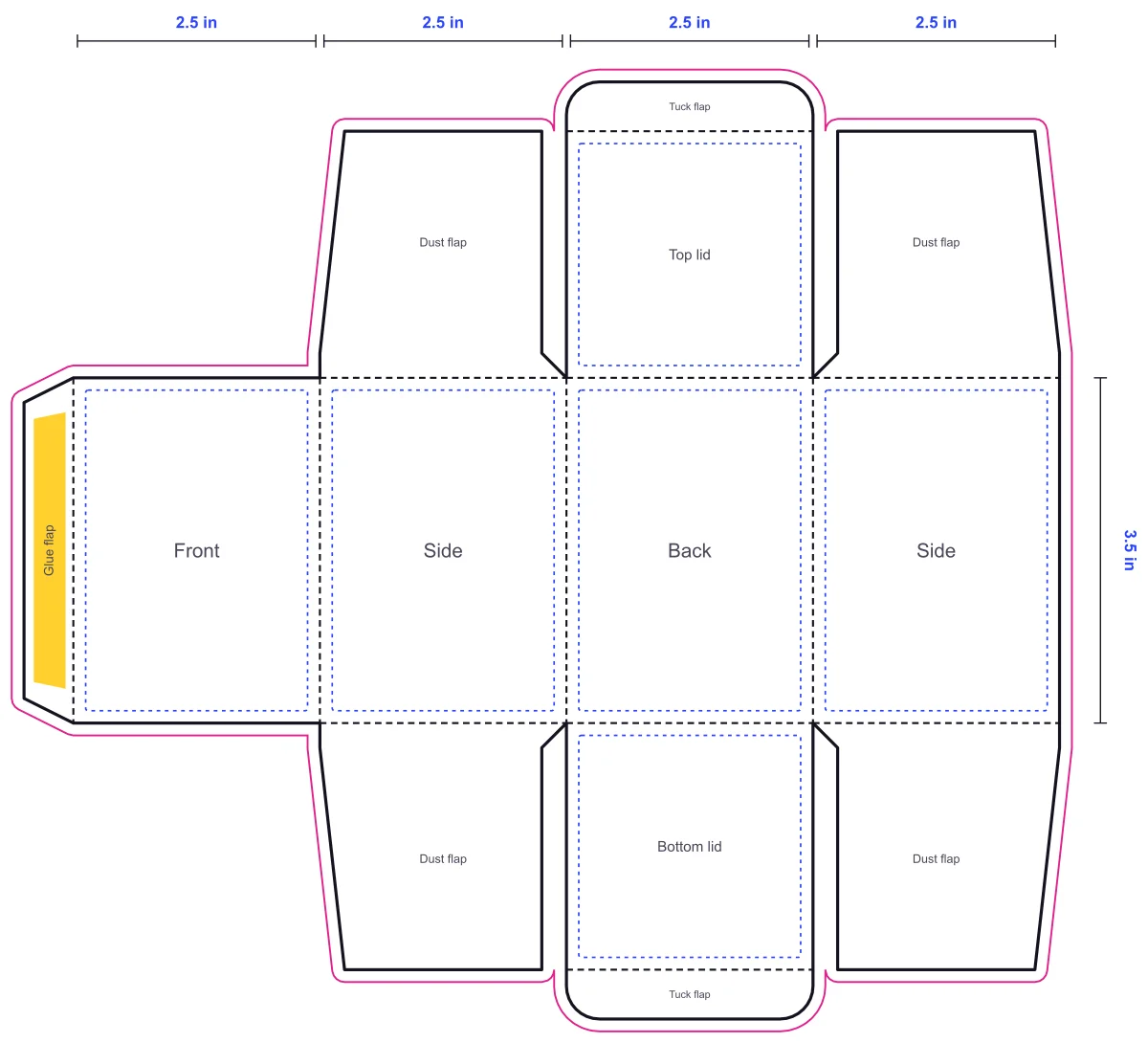
- Cut lines
- Solid lines where the box is cut from the sheet.
- Fold lines
- Dashed lines where the board creases into panels and flaps.
- Glue flap
- The narrow strip that joins the box into a tube.
- Bleed
- Artwork carried past the cut line, so no white edge shows after trimming.
- Safe zone
- An inner border that keeps text and logos clear of folds and edges.
How to design your blind box on a template
- 1
Open it in your design app
Canva, Illustrator, and Affinity all work. Put the template on its own locked layer so it stays put while you design.
- 2
Design the front first
The front is what shoppers see on a shelf. For a series, save the back panel to show the full lineup.
- 3
Mind the bleed and safe zone
Carry background color past the cut line, and keep names, logos, and small print clear of the folds.
- 4
Hide the template and send it
Turn the template layer off before you export. A free digital proof and 3D mockup come back before anything prints.
Why your template is drawn to your box
Your template starts from the length, width, and height you share, so the finished carton fits your product closely. Nothing rattles around inside, and there's no need for extra filler.
It's also drawn for the box style you choose. Tuck end boxes open and close again, which suits playing cards or gifts people keep coming back to. Seal end boxes are taped inside the top and bottom flaps and open with a tear-open zipper, the classic blind box unboxing. Want cube boxes? Enter the same number for length, width, and height.
When your artwork is ready, our team checks the files and sends a final proof. Nothing prints until you approve it, and production takes 8 to 10 business days from that approval.
What comes with every order
- A template drawn to your box size
- A free digital proof and 3D mockup
- A final proof before printing
- Free shipping to the US, Canada, UK, Australia, and New Zealand
Blind box template questions
What size is your blind box?
Share a rough quantity and your deadline, plus your box size or template code. Your free estimate arrives within 24 hours.